User Tools

Site Tools


Sidebar

Dan's Wiki

DokuWiki Instructions (local) DokuWiki Manual
Site Checker (Orphans Wanted)
Edit Sidebar

vitualbox:start

Oracle Virtual Box

Vagrant needs this - a vitual Linux host that runs on the Windows Client.

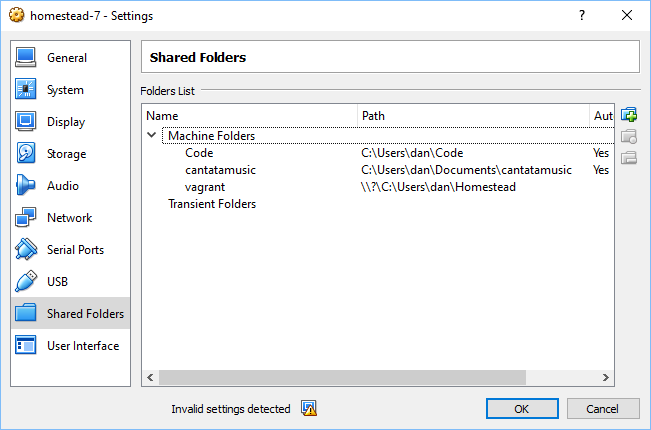
In Oracle VirtualBox, share some Windows directories:

Then in the Linux host, mount them. You can see the names of the shares with:

df -h
root@homestead:/etc# df -h
Filesystem                    Size  Used Avail Use% Mounted on
udev                          983M     0  983M   0% /dev
tmpfs                         201M  7.4M  193M   4% /run
/dev/mapper/vagrant--vg-root   39G  3.9G   33G  11% /
tmpfs                        1001M  4.0K 1001M   1% /dev/shm
tmpfs                         5.0M     0  5.0M   0% /run/lock
tmpfs                        1001M     0 1001M   0% /sys/fs/cgroup
/dev/sda1                     472M   97M  352M  22% /boot
cantatamusic                  466G  381G   85G  82% /media/sf_cantatamusic
Code                          466G  381G   85G  82% /media/sf_Code
tmpfs                         201M     0  201M   0% /run/user/900
Code                          466G  381G   85G  82% /home/vagrant/Code
/var/www/html/cantatamusic    466G  381G   85G  82% /var/www/html/cantatamusic

Use the shared name as “NAME” below:

mount -t vboxsf NAME /mnt/folder

According to the Oracle instructions here:

https://forums.virtualbox.org/viewtopic.php?t=15868

I modified /etc/rc.local to add the mount steps:

#!/bin/sh -e
#
# rc.local
#
# This script is executed at the end of each multiuser runlevel.
# Make sure that the script will "exit 0" on success or any other
# value on error.
#
# In order to enable or disable this script just change the execution
# bits.
#
# By default this script does nothing.
 
mount -t vboxsf cantatamusic /var/www/html/cantatamusic
mount -t vboxsf Code /home/vagrant/Code
exit 0
vitualbox/start.txt · Last modified: 2016/12/16 00:58 by dwheele