User Tools

Site Tools


Sidebar

Dan's Wiki

DokuWiki Instructions (local) DokuWiki Manual
Site Checker (Orphans Wanted)
Edit Sidebar

programming:warfileformat

This is an old revision of the document!


WAR File Format

From http://docs.oracle.com/javaee/5/tutorial/doc/bnadx.html

Web Modules

In the Java EE architecture, web components and static web content files such as images are called web resources. A web module is the smallest deployable and usable unit of web resources. A Java EE web module corresponds to a web application as defined in the Java Servlet specification.

In addition to web components and web resources, a web module can contain other files:

  • Server-side utility classes (database beans, shopping carts, and so on). Often these classes conform to the JavaBeans component architecture.
  • Client-side classes (applets and utility classes).

A web module has a specific structure. The top-level directory of a web module is the document root of the application. The document root is where JSP pages, client-side classes and archives, and static web resources, such as images, are stored.

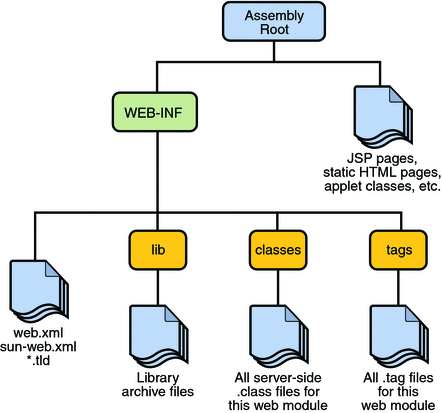
The document root contains a subdirectory named WEB-INF, which contains the following files and directories:

  • web.xml: The web application deployment descriptor
  • Tag library descriptor files (see Tag Library Descriptors)
  • classes: A directory that contains server-side classes: servlets, utility classes, and JavaBeans components
  • tags: A directory that contains tag files, which are implementations of tag libraries (see Tag File Location)
  • lib: A directory that contains JAR archives of libraries called by server-side classes

If your web module does not contain any servlets, filter, or listener components then it does not need a web application deployment descriptor. In other words, if your web module only contains JSP pages and static files then you are not required to include a web.xml file. The hello1 example, first discussed in Packaging Web Modules, contains only JSP pages and images and therefore does not include a deployment descriptor.

You can also create application-specific subdirectories (that is, package directories) in either the document root or the WEB-INF/classes/ directory.

A web module can be deployed as an unpacked file structure or can be packaged in a JAR file known as a web archive (WAR) file. Because the contents and use of WAR files differ from those of JAR files, WAR file names use a .war extension. The web module just described is portable; you can deploy it into any web container that conforms to the Java Servlet Specification.

To deploy a WAR on the Application Server, the file must also contain a runtime deployment descriptor. The runtime deployment descriptor is an XML file that contains information such as the context root of the web application and the mapping of the portable names of an application’s resources to the Application Server’s resources. The Application Server web application runtime DD is named sun-web.xml and is located in the WEB-INF directory along with the web application DD. The structure of a web module that can be deployed on the Application Server is shown in Figure 3-5.

programming/warfileformat.1469664532.txt.gz · Last modified: 2016/07/28 00:08 by dwheele