User Tools

Site Tools


Sidebar

Dan's Wiki

DokuWiki Instructions (local) DokuWiki Manual
Site Checker (Orphans Wanted)
Edit Sidebar

blender:start

This is an old revision of the document!


Blender Notes

My Notes and Tips

UV Distribute

Python Notes

Blender Data Structure

Blender Animation

http://www.blendernation.com/2010/11/17/changing-cameras-during-an-animation-in-blender-2-5/

How to change cameras in Blender Animation:

So basically: - press M over the timeline to put a marker where you want the camera to switch; - to associate a new active camera to an already-existing marker: with the marker selected (right-clicked) and the camera made active (Ctrl+Num0), press Ctrl+B over the timeline;

The markers can be manipuled much like the objects in the 3D view. Select with right-click, G to drag, Shift+D to duplicate, etc.

Make Equal Space Matrix

This is to take a warped 3D mesh, and make it into a nice even equally-spaced mesh. Although there are a lot of steps, this should take less than a couple of minutes.

Unwrap mesh in Blender.

Select Top edge with Alt-RMB Straighten with

W I (WeldAlign, Align Y)

Drag it to be above any other verties with G Y, then move up. Select Bottom edge with Alt-RMB Straighten with

W I (WeldAlign, Align Y)

Drag it to be below any other verties with G Y, then move down.

Select left edge with Alt-RMB

W L  (WeldAlign, Align X)

At this point the left edge is perfectly vertical. Drag this vertical line of vertices to be more left than any other vertices with G X, then move left.

Select Right edge with Alt-RMB

W L  (WeldAlign, Align X)

At this point the Right edge is perfectly vertical. Drag this vertical line of vertices to be more Right than any other vertices with G X, then move left.

Select Top edge with Alt-RMB Distribute

W U  (WeldAlign, UV Distribute)

Select Bottom edge with Alt-RMB Distribute

W U  (WeldAlign, UV Distribute)

Then, from left to right, select each vertical line with Alt-RMB Straighten with

W X (WeldAlign, Straighten X)
W U (WeldAlign, UVDistribute) (this step is good only if extrusion lengths are symmetrical)

4/Jan/2014 15:30

Exporting Blender to Daz3D

Looks like exporting from Blender to DAZ 3D requires OBJ format. Getting the scaling and angles correct is a trick.

23/Jun/2012 10:31

Trying DAZ Studio 4.5's Import→Blender preset 1 unit = 50 cm (which results in 5000% scaling): Worked, although needs to be rotated. Scaling may be off a bit. 23/Jun/2012 10:43

In DAZ Studio 4.5's import dialog, changed to X-Y-Z Axis Conversion to match inputs X-Y-Z, rotation became correct. (All check boxes are checked.) No “Invert Positive Direction” boxes are checked.

23/Jun/2012 10:52

Noticing that the scaling is off. Created a box 6' x 1'x1' using Blender Imperial measurements. It appears to be only about 4 feet tall when imported into DAZ3D.

23/Jun/2012 11:06

Found good solution: Within Blender, use Imperial units (or metric, or regular, where 1 blender unit basically equals one meter). Export as OBJ. Within DAZ3D, Import as “Cinema 4D” where 1 unit = 1 meter. This also sets X-Y-Z Axis Conversion to match inputs X-Y-Z.

23/Jun/2012 11:52

Apparently, bones and rigging won't export between programs.

23/Jun/2012 16:50

Also see /Blender/notes/notes.txt

21/Jun/2013 20:17

Creating Normal Maps, Displacement maps

Purchased ShaderMap, upgrading to 3.0.6 11/8/2015 for $29. Rendering Systems.

To use, add a normal map as a second texture. In the Texture settings, select Image Sampling→Normal Map, Tangeant. Influence Geometry→Nor, .5 or to taste

Armatures and Skinning

For the basic rope cylinder with many extrusions (set up that way so that bending works better), had better results by setting up the bones so that both the head and tail are between the cuts. Otherwise the bends become too sharp

13/Jan/2014 18:40

Blender Free-Form Notes

Pointing a camera at an object: http://blender3dvideos.blogspot.com/2010/07/25-empty-object.html

An Empty Object is often used as part of a constraint system. We'll make the first Empty Object as the target of the constraint. Select the Camera object. Add a Track To constraint. To: = -Z and Up: Y. Make the first Empty object (Empty) the Target of the constraint. The camera is now tracking the Empty object. If the camera is moved, it still points to the empty object. This is a convenient method of animating or focusing the camera or what the camera is focused on. Moving the Empty object makes the camera move as well.

Camera Settings are available by selecting the camera, then in the properties window, select “Object Data” icon, which provides, Mist, Limits, etc.


Tried to UV the front of a building. Looks like multiple planes but when unwrapping, they aren't contiguous. Discovered this can be fixed by subdividing the larger pieces, then Vertices→Merge to “knit” the multiple pieces back to become one piece.

23/Feb/2012 15:44

Move camera to view: Ctrl-Alt-Num0


Had problems with leading edge flaps. Transform was moving along X, instead of matching X local of parented empty. To solve. I moved empty back to zero, unparented the flap, then re-parented it, then re-rotated the empty. 11/28/2016

Groups

Select items to become a group, and group them Ctrl-G. Can be renamed in Object Properties. Shift-A → Group-Instance to add another linked copy. This can be done dynamically as well, so that the source object can be in its own file.

http://blender.stackexchange.com/questions/105/is-it-possible-to-group-several-objects-and-then-manipulate-them-scale-rotate

Group duplication

Select some items, and group them. Select one of the items in the group, and in object properties, group, there is a button that says “from cursor.” With the 3D cursor at a reasonable origin of the group, click “from cursor.” Now, to add more instances, click shift-A and select the Group Instance.

21/Jul/2012 16:37

To make linked copies of groups, follow the above directions to create a group with the items to be copied. Now create an empty at a relevant location. Perhaps shorten the axis to suit. In the object properties for the empty, in “Duplication” click “Group,” then select the group to be copied. Place the empty where the copy is desired. Name the empty something like “Bolt Asmbl 8.001”. Now you can copy this empty to get another instance. Changes to the first master group members are immediately propogated to the other copies.

31/Aug/2012 19:16


To create a PNG that can be UV mapped to a plane and then not have a strange white outline, inside of Gimp, when exporting as PNG, be sure to turn off “Save color values from transparent pixels” in the “Export Image as PNG” dialog.

27/Oct/2012 17:17

Have problem when blurring an image edge, making it semi transparent. Some of this caused the image to appear white in blender.

28/Oct/2012 19:09

Fixed by turning off Image Sampling → Alpha → “Use”

28/Oct/2012 19:19


To let bit map transparency cause the texture to be transparent, create a PNG with some transparency, UV map it to a plane, then on the material tab, select Face Textures, and Face Textures Alpha, and turn on Transparency.

31/Jan/2014 19:55

Graininess Reduction in Cycles

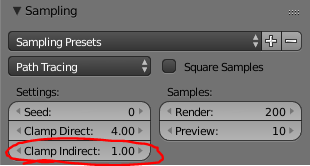
To reduce graininess using Cycles, set

Clamp Direct4.0
Clamp Indirect1.0

in Render settings, Sampling.

Got a less grainy result when rendering with World (settings) → Gather → Approximate

31/Oct/2012 20:36

Transparency with Paper Sky

In World (settings) under World, a plane Transparency had a visible “sheen” when “Paper Sky” was checked. By un-checking it, transparency looked fine. I thought that “Paper Sky” was related to “Horizon Color,” but apparently isn't.

31/Oct/2012 20:38


Reflection Controlled By Image Map

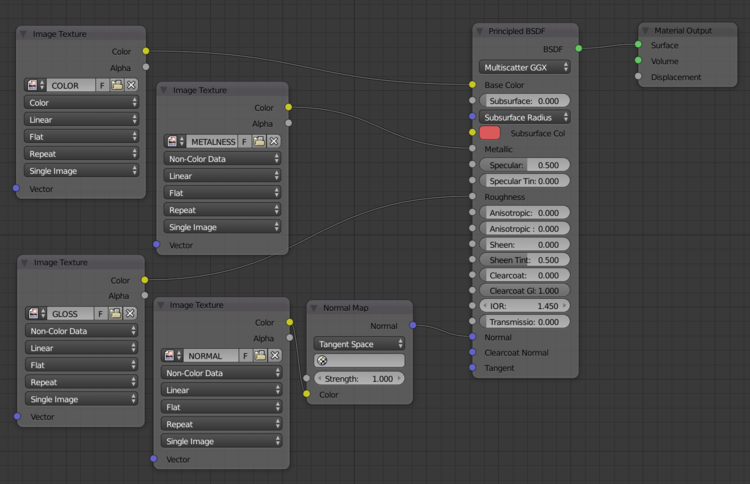
Here's a “formula” to add reflection controlled by an image map. The effect is exaggerated. The Glossy “Roughness” can be increased to blur the reflection.

Importing from DAZ3D

In Daz3D, export as OBJ, settings as follows:

Scale 1% (not sure) Axis Conversion, X→X, Y→Y, Z→Z Checked: X Ignore Invisible Nodes X Write UV Coordinates X Write Normals X Write Object Statements X Write Groups X Use Node Name(s) X Write Surfaces X Write Material Library X Collect Maps

This exports several files, the main one is .obj Find the file with the extension .mtl, open it, and remove the leading slash on /Maps/ by search and replacing to Maps/

This generally works, although the eye lashes turned white. Might need to activate proper Alpha handling.

Helpful: http://maddieman.wordpress.com/2012/04/23/exporting-daz-studio-4-figures-to-blender/ http://www.4colorgrafix.net/2011/06/dazstudio-blender2-5/

About the .obj and .mtl http://en.wikipedia.org/wiki/Wavefront_.obj_file

The problem is that Daz3D doesn't put much Specular in, so the default (really shiny) is in effect. Need to add into .mtl

 "The specular color is declared using Ks, and weighted using the specular coefficient Ns.
    Ks 0.000 0.000 0.000     # black (off)
    Ns 10.000                # ranges between 0 and 1000"

21/Jun/2013 20:17

Wrote app today to add in Ks 0.5 0.5 0.5 Made Java GUI in Eclipse - DazObjectFileAdjuster/src/dwheele/daztool/MtlFileProcessor.java and FileChooserGUI.java. This adds in the specular where missing, and takes off the leading slash for the /Maps/etc.

22/Jun/2013 11:01

With certain hair, there is a Skull cap, and I had hard time making it not show up. The solution was to change Transparency Alpha and Specular to 0 for the material, and unchecking “Traceable”. Without this, there is a stranging shading against the forehead.

To fix eyelashes, find eyelash material, click the texture tab. For top texture, select the Image Sampling - Alpha Invert

19/Dec/2012 13:12


Had some problems using Game Engine and Physics. This apparently was a big problem:

Currently, there is a bug: The 3D View does not display this bounds preview where it actually will be during the game. To see it, go to Game » Show Physics Visualization and look for the white (or green, if sleeping) geometry.

http://wiki.blender.org/index.php/User:Sculptorjim/Game_Engine/Physics/Objects/Rigid_Body

I made a shape by joining two shapes, and the bounding box was way off. Changing the bounding box to “Triangle Mesh” instead of “box” worked much better.

I was able to fix the bounding box by: “….you should generally set the origin by looking at the T-toolshelf after you do the Set Origin, and changing the Center from Median Center to Bounds Center. Blender will remember this change for future CtrlAlt? ShiftC executions. All Collision Bounds are centered on this origin. All boxes are oriented locally, so object rotation matters.”

20/Dec/2012 12:52

Used “Game Logic” When “Adding” to a property, it doesn't work unless the Property is set up first, using “Add Game Property” on the right side of the screen. This caused the Property to stop showing up in Red, and working properly.

20/Dec/2012 12:55

To get an item to rotate around a pivot, it has to be “Rigit Body” (Dynamic doesn't rotate) and it appears to need to be struck by something - it won't rotate on it's own, like the trap door.

20/Dec/2012 17:01


To render so that background is transparent when making PNGs, go to Properties Editor, Render panel, Shading panel, choose Alpha: Transparent instead of “Sky”

28/Feb/2014 17:45

Online Material Library

Camera Tracking, Motion Tracking

https://www.youtube.com/watch?v=8Ysof3atAng

Also try Blender Guru's, with sink hole.

Free Renderfarm

Combining PNG frames to make a movie

  1. Go into Video Editor (control-F8).
  2. Shift-A to add frames
  3. Select all of the PNG frames
  4. Select Settings of Video
  5. Render

11/16/2015

Math Function Mesh

https://wiki.blender.org/index.php/Extensions:2.6/Py/Scripts/Add_Mesh/Add_3d_Function_Surface

Turned on Add Mesh functionality - User Preferences→Add Mesh→Extra Objects. Then use Shift-A→Mesh→Math Function→Z-Math Surface

Function: sin(y) * .5

Cycles Material

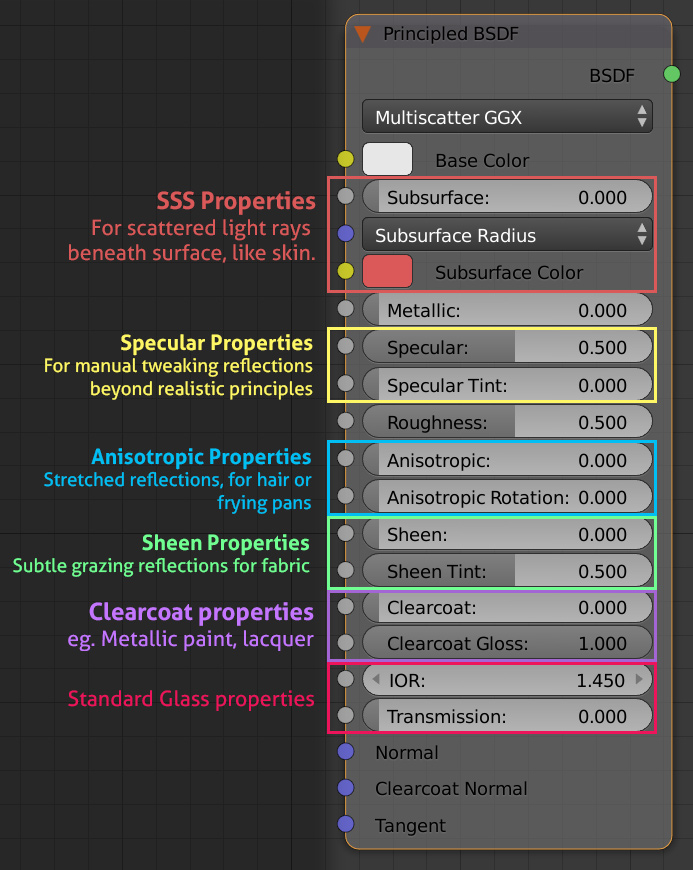
Principled Shader

How to Bake, Using Cycles

After baking he used “Method to display” of “Textures.” (I had used Rendered, which didn't work very well.

Settings to make an Animation Viewable As-Is in iPad

  • Output=H.264
  • Format=MPEG-4
  • Codec=MPEG-4 (divx)

How To Set Up a Local Space to Pivot On

I wanted to set up a constraint so that a rudder would pivot on its local Z axis, because it is at 22 degrees. This would work from a Transformation constraint, except that when you parent the Rudder to the overall handle (to control the whole airplane), the local is now based on the overall handle (which is at World space zero).

The solution was to create an empty at 22 degrees, parent the Rudder to this rotated empty, then parent the rotated empty to the overall handle.

Method, Script, to allow Switching Material for Object for Baking

Use this method so that there can be two Materials (including UV and image map) for an object. Only one is active at a time, but this allows easy switching between the original material for an object, and the Baked material.

For each material, add a “Mix Shader” as the last shader before the Material Output. Connect the regular material to the bottom point on the Mix Shader, and add Texture and Shader as appropriate (e.g., Image Texture and Emission Shader) to the upper point on the Mix Shader. To toggle everything on the Blender, use this script which toggles between them. It grabs based on the name *UseBakeSwitcher* so it is possible to set up more if it is desired to toggle a portion of the materials.

import bpy
 
setValue = -1
for mats in bpy.data.materials:
  myName = mats.name
#  print (myName)
  if mats.node_tree:
    for nd in mats.node_tree.nodes:
      if nd.label == "UseBakeSwitcher":
#        print ("Toggling " + nd.name + ", in " + myName)
        if setValue < 0:
            if nd.inputs[0].default_value == 1:
              setValue = 0
            else:
              setValue = 1
        nd.inputs[0].default_value = setValue

To bake an object's materials, you have to select the object, and the image texture node for the material that is to receive the baked image need to be selected. This image texture need not be active.

7/5/2018

Blender 3.0 Starting up Slowly

Some forums are saying that an unmounted SD card or bad Network access can cause this. Will look for this.

1/19/2022

Human Generator

[#hg]

blender/start.1722368372.txt.gz · Last modified: 2024/07/30 19:39 by dwheele